Unpacking the kit…
World Builder: build a low-poly world in your browser
Place pieces from the LowPolyCrate kits on a 48 m plot and build a village, a castle, a harbour or a winter camp without installing anything. Walls, gates and towers join edge to edge, everything snaps to a half-metre grid (one metre for modular pieces), and you can rotate, copy, recolour and undo as you go. It works on phones too.
What you can do
Bring it to life
Add animated characters, animals and creatures: a blacksmith hammering, a guard on patrol, a dog lying in the sun, a horse galloping the lanes, a dragon breathing fire now and then or circling the rooftops. Each plays a looping animation where it stands or goes round a route you click out on the ground, at a walk, a trot or a run; now and then a dragon roars, a knight swings, an archer looses an arrow and a villager takes a drink, and characters hold swords, shields, axes and tools you can swap.
Shape the ground
Raise hills, dig valleys and riverbeds, flatten a plateau for a castle and smooth the slopes with a brush, or start from a ready-made hill, plateau, river valley or rolling hills. Houses stand level on earth pads, paths and fences follow the slope, and a spot too steep offers to level the ground. Steep slopes turn to rock, and the plot shows its soil at the edges.
Place it exactly
Stand a lantern on a table or a guard on a wall walk, lift anything off the ground, make a piece bigger or smaller, lean a rock or a fallen log, type a position or a turn, pick the grid size or switch it off, nudge with the arrow keys and measure any distance.
Handle big scenes
Drag a box round pieces to select them, copy and paste between scenes, lock the walls you build against, hide a roof while you furnish the room under it, and right-click (or press and hold) for everything else.
Paint and draw
Paint the ground with grass, meadow, dirt, cobbles, sand or water, and draw paths of any shape.
Find a piece fast
Search by name, kind, tag or kit (a lantern, a pine, the canal), star the pieces you use most so they lead the list on every device, and find the ones you used lately at the top.
Scatter a forest
Brush trees, rocks, bushes and flowers from a kit across the ground in one stroke: each one turned its own way and a little bigger or smaller, kept off buildings, paths and water. Shift erases them again, and a stroke is one undo step.
Set the light
Light the scene by day, dusk or night, with lamps that glow, and switch the whole scene to another theme in one click.
Start from a template
Begin from a finished world, grouped by the kit it shows (a walled keep, a canal city, a sky port), or from an empty plot. A template opens as your own copy, and on a first visit a short guide shows the basics as you go.
Build faster
Swap the pieces you select for another in one step: each keeps its place, turn and height, and one undo puts them back. Save pieces that belong together (a house with its fence and lamps) to My groups and place them again in any scene, on any device.
Save and share
Save scenes to a free account, open them on any device and share them with a link that anyone can open and remix. Pick the view the link's picture shows in chats and feeds.
Take a photo
Frame the scene and take an HD or 4K picture of it, without the grid or outlines, on its own background or a transparent one: for a store page, a post or a pitch. Free, no account needed.
Export it
Export the whole scene as one GLB, or only the pieces you select (a house, a gatehouse) centred in a GLB of their own, or the whole scene as a Godot 4 project with colliders and lighting, hills and all; characters and animals keep their rig and keep playing their animation. Anyone exports one GLB with every piece whose GLB is free, no account needed; the animated heroes, foes and animals, characters you made with Pro parts, and the Godot folder come with Pro and Lifetime.
Six themes, one click
A theme recolours every piece in the scene at once: copper leaves in autumn, snow on every roof in winter, sandstone in the desert. Every kit names its colours the same way (roof, leaves, stone, wall…), so a theme fits all of them. Colours you set on a piece yourself stay as they are.
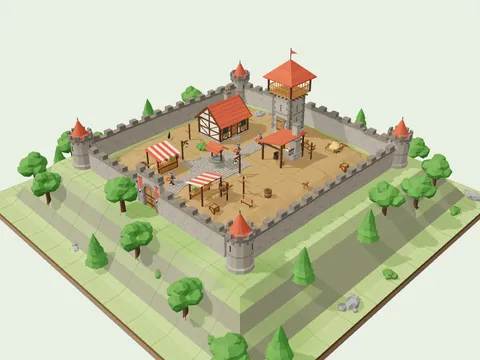
Classic · The kit as it ships
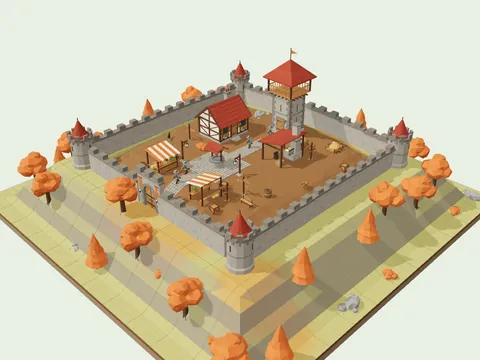
Autumn · Copper leaves, warm roofs
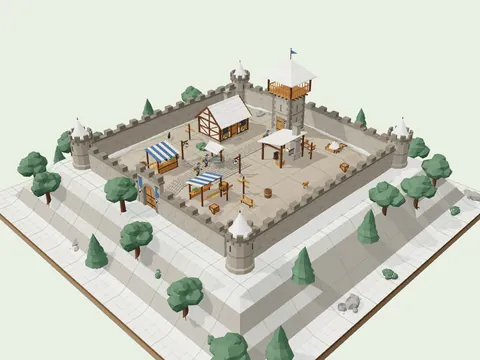
Winter · Snow on every roof
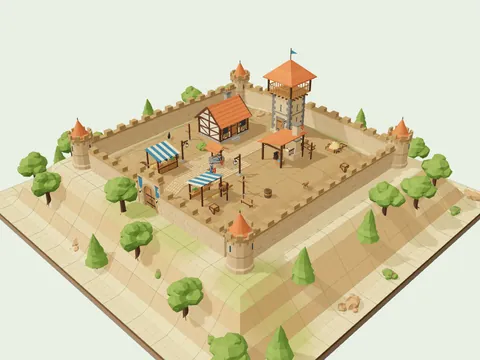
Desert · Sandstone and terracotta
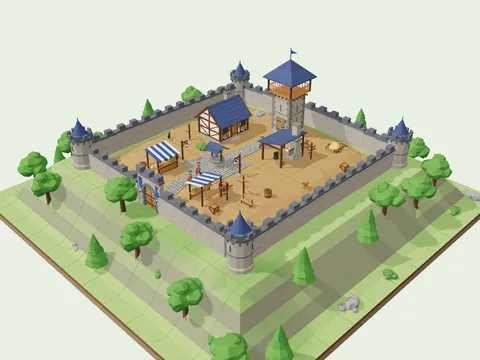
Royal · Slate roofs and blue banners
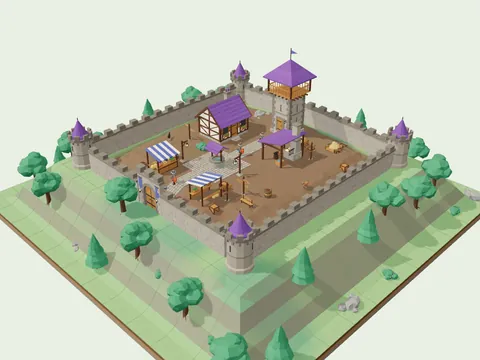
Enchanted · Teal leaves and violet caps
The same themes come as free theme materials for Unity, Godot and three.js, to recolour a whole kit in your own project, even while your game runs.
Every piece in the builder is a real asset you can download on its own: browse the kits or all assets, or read how the scale and grid conventions work.